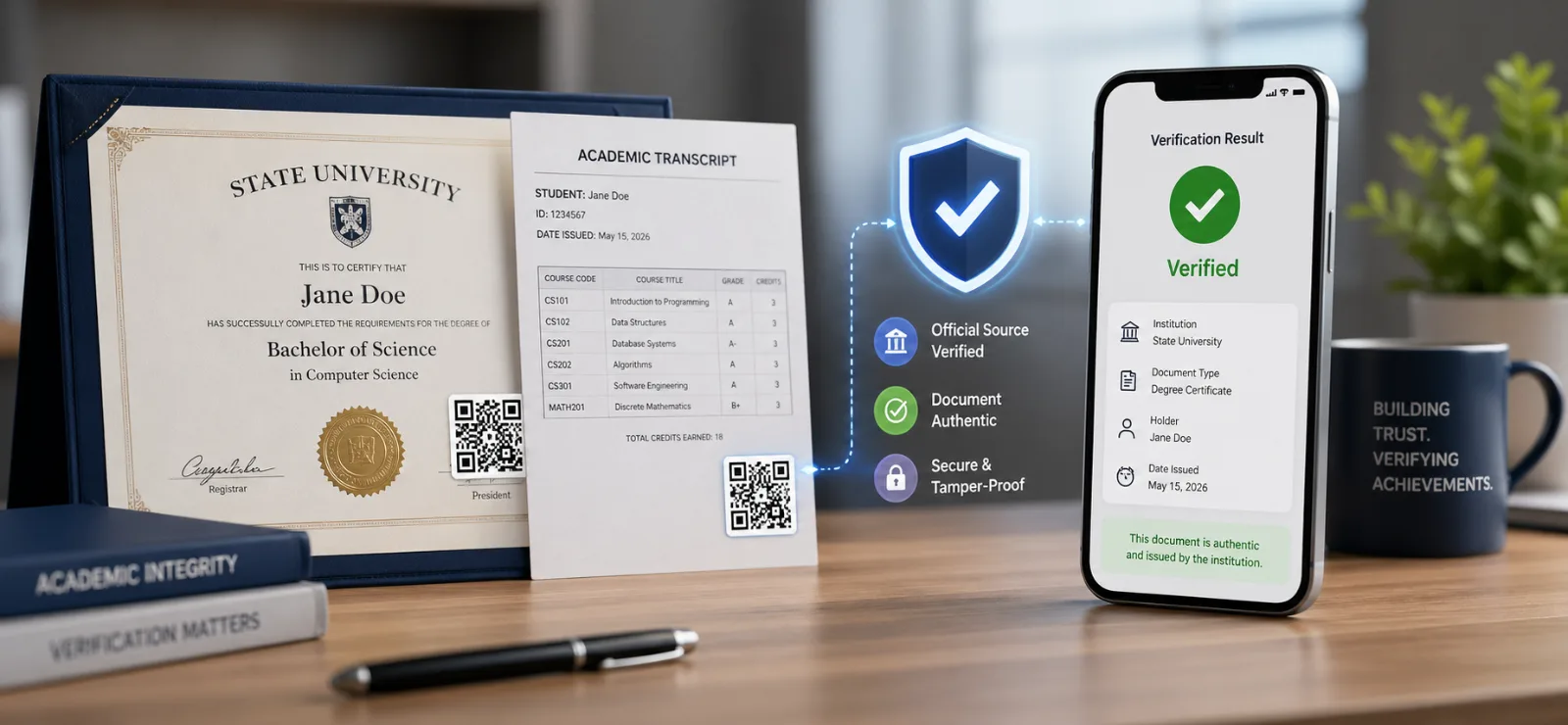
A hiring manager opens an email at 9:14 a.m. The attached PDF transcript looks immaculate — university crest in the top-left, registrar's signature at the bottom, GPA of 3.84, conferral date six weeks ago. The candidate starts in nine days.
How does the hiring manager know any of it is real?
In 2026, that question has stopped being rhetorical. Credential fraud is now consistently ranked among the top five document-fraud categories worldwide, and the arrival of generative AI has collapsed the cost of producing a convincing fake transcript from a few hundred dollars on a dark-web forum to roughly the price of a ChatGPT subscription. Universities, employers, and background-check firms are all dealing with the same backlog of "looks legitimate" PDFs that nobody has time to call a registrar about.
This guide walks through the three ways degree certificates and transcripts get verified today, where each one breaks, and how QR-code verification is rapidly becoming the default for institutions that issue credentials internationally. At the end, there's a step-by-step for universities that want to start issuing QR-verified documents from Microsoft Word or Google Docs in under thirty minutes.
Why credential verification just got harder
Three things changed between 2022 and 2026, and they all point in the same direction.
Generative AI made forgeries cheap. Producing a convincing PDF of a transcript — correct fonts, correct watermark, correct seal placement — used to require Photoshop skills and a template. It now requires a prompt. Background-check vendors have publicly reported a sharp uptick in AI-generated education forgeries since 2024, and several major US background-check firms now flag "AI-likely" credentials as a separate review queue.
Hiring cycles got faster. The average time-to-hire in tech and professional services has compressed by roughly a third since 2020. Recruiters do not have a week to wait on a registrar's office in another time zone, so a meaningful share of credentials now go unverified or get a cursory check.
Cross-border hiring became normal. Remote work pushed companies into hiring across thirty or fifty countries instead of three or five. Each country has its own university accreditation system, its own privacy regime, and its own holidays. Calling the registrar at 2 a.m. their time is not a strategy.
The combination — easier forgeries, faster hiring, more borders — is why a method that gives an answer in two seconds, anywhere in the world, has suddenly become essential rather than nice-to-have.
The three ways credentials are verified today
There are essentially three patterns in use right now. They are not equally good.
Method 1: Manual callback to the registrar
The original method, and still the most common in much of the world. The verifier finds the issuing institution's registrar or records office, sends an email or makes a call, asks them to confirm that a specific person earned a specific degree on a specific date, and waits.
How it works in practice: Hiring manager emails registrar@example.edu with the candidate's name, date of birth, claimed degree, and graduation year. Sometimes a release form signed by the candidate is required first. The registrar's office checks their student information system and emails back a yes/no.
What it costs: Officially free in most jurisdictions, but the real cost is the verifier's time. Industry surveys put the all-in cost of manual verification at roughly $30–$60 per candidate when you count the back-and-forth, the chasing, and the candidate's lost momentum.
How long it takes: Best case, 24–48 hours. Realistically, three to ten business days for international institutions, and longer over summer breaks.
Where it breaks:
Time zones. A US recruiter and an Indian university registrar have a four-hour overlap window.
Privacy law. GDPR-style regimes increasingly require the candidate's explicit consent before the registrar can confirm anything, adding another email round-trip.
Identity matching. The registrar can confirm "we awarded a BSc to a person of this name on this date" — they often cannot confirm "this PDF in front of you is a true copy of the document we issued."
It does not scale. A registrar's office that handles five verification requests a week cannot suddenly handle five hundred.
Method 2: Third-party verification services
The professionalised version of method one. National clearinghouses (the National Student Clearinghouse in the US, HEDD in the UK, Diploma.me in parts of Europe) and commercial verifiers (Parchment, World Education Services, Sterling, Checkr) act as a paid intermediary. The university uploads or licenses its records to the clearinghouse, and verifiers query the clearinghouse instead of the registrar.
How it works in practice: The verifier creates an account with the clearinghouse, submits a query (sometimes with a candidate consent form), pays a per-query fee, and receives a structured confirmation, usually within a business day.
What it costs: Per-query fees typically run from a few dollars to $20+ depending on the service and country. Universities that join the clearinghouse pay an annual subscription on top.
How long it takes: Hours to a couple of business days for institutions covered by the clearinghouse. Out-of-network institutions fall back to method one.
Where it breaks:
Coverage. National clearinghouses are good in their home country and patchy abroad. A US clearinghouse will not cover an Indonesian polytechnic; a UK service will not cover a Brazilian federal university.
Latency. Hours, not seconds. Still too slow for in-the-moment hiring decisions.
Cost stack. Per-query fees compound when you are screening hundreds of candidates a quarter.
It still verifies a record, not a document. The clearinghouse can confirm the candidate has a degree on file. It does not necessarily confirm that the specific PDF in the verifier's inbox matches what the institution issued.
Method 3: QR-code verification on the document itself
The newer pattern, and the one this guide is about. The university embeds a QR code directly on the certificate or transcript when it is issued. Anyone, anywhere, can scan that QR code with a phone camera and land on a hosted "proof page" served by the issuing institution (or its verification provider) that shows the original document, who issued it, when, and to whom.
How it works in practice: The recipient (graduate) gets a PDF with a QR code in the corner. When they share the PDF with an employer, the employer points their phone at the QR code, the camera opens a browser tab, and the proof page loads. Two seconds, no account, no fee.
What it costs: For the issuer, a per-document or per-seat subscription with a verification platform — typically a few dollars per credential issued, less at volume. For the verifier, zero. There is no per-check fee.
How long it takes: Two to five seconds.
Where it breaks (honestly):
It only works for documents issued with a QR. Legacy certificates from before the institution adopted QR verification still need method one or two.
It depends on the issuer keeping its verification service running. A defunct provider would break old QR codes — which is why institutions should choose providers with credible long-term hosting commitments, and ideally export their verification records to a portable format.
It is not a substitute for accreditation checks. QR verification proves the document is a true copy of what the institution issued. It does not prove the institution is itself legitimate. (Worth saying out loud: a QR-verified certificate from an unaccredited diploma mill is still worthless.)
Side-by-side: which method should you use?
DimensionManual callbackThird-party clearinghouseQR on documentVerifier timeDaysHoursSecondsVerifier cost$30–$60 in time$5–$20 per query$0Issuer setupNoneAnnual subscriptionPer-credential feeCoverage abroadPatchyCountry-dependentUniversalPrivacy postureHeavy paperworkHeavy paperworkVerifier sees only what the issuer chose to publishConfirms the document, not just the recordNoSometimesYesWorks for legacy docsYesIf indexedNo
For an institution issuing thousands of credentials a year to graduates who will be hired across multiple countries, QR verification is the only one of the three that scales without imposing a new tax on either side of the verification.
Why QR verification is winning
Beyond the table above, three things are pulling institutions toward QR.
It is cheaper for everyone except the issuer, and the issuer is the only party with a budget for it. Verifier-pays models (clearinghouses) push cost onto recruiters and background-check firms, which is exactly the audience least willing to pay. Issuer-pays models (QR) align cost with the party that benefits from making their credentials trusted.
It works on paper. A QR code printed on a paper diploma still works. Scan it with any modern phone, get the proof page. This matters more than digital-natives expect: graduates frame their degrees, take photos for LinkedIn, send scanned copies to immigration officials, and present originals at interviews. QR follows the document everywhere it goes.
The proof page is a defensible UX. Manual callbacks give you "yes." Clearinghouses give you a database row. A QR proof page can show the original document, the issuer's verified identity, the issuance date, an audit trail of any changes, and the registrar's contact details — in one screen, in the verifier's language, on their phone. That is a different category of trust than a one-line confirmation email.
How to add QR verification to a degree certificate or transcript with VerifyDoc
This is the practical bit. The example below uses VerifyDoc with Microsoft Word; the Google Docs flow is identical except where noted.
For universities (the issuer side)
Step 1. Connect VerifyDoc to your document tool. Open Word and install the VerifyDoc add-in from the Office Add-ins store, or sign into verifydoc.ai/start-free?editor=microsoft-word. For Google Docs, install the VerifyDoc add-on from the Google Workspace Marketplace. One sign-in covers both.
Step 2. Open your degree certificate or transcript template. Use whatever template your registrar's office already issues — there is no need to redesign the document.
Step 3. Insert the verification block. From the VerifyDoc sidebar, click Insert verification block. The add-in places a small QR code in the position you chose (typically bottom-right of a certificate, footer of a transcript), along with a short caption like "Scan to verify authenticity at verifydoc.ai." The block is sized for both screen and print.
Step 4. Issue the document. Save and export the PDF as you normally would. VerifyDoc creates a verification record at the moment of issuance, stamps the QR with a unique ID linked to that record, and stores a hash of the final PDF. Send the PDF to the graduate by email, post it to your student portal, or print it for the conferral ceremony — the QR works in every case.
Step 5. Hand the verifier nothing extra. The recipient now has a self-verifying document. No portal logins, no follow-up emails to your registrar's office.
For employers and background-check teams (the verifier side)
Step 1. Open the candidate's credential. PDF on screen, scanned image, or printed copy — all work.
Step 2. Scan the QR code. Use any phone camera (iOS and Android both decode QR natively, no app required). Or, for desktop, click the QR if the PDF supports embedded links.
Step 3. Read the proof page. A page hosted by the issuing institution loads in your browser. It shows:
The original document, side-by-side with the one you have, so you can spot any tampering.
The issuer's verified identity (name, accreditation status, registrar contact).
The recipient's name and the date of issuance.
A change log if the document has ever been reissued or revoked.
Step 4. Make the hiring decision. If the proof page matches the document and the issuer is one you trust, you have the answer in under five seconds. If it does not match — different name, different date, or no proof page at all — you have a clear escalation reason for further review.
That is the entire workflow. No accounts, no fees, no email chains.
What a hosted proof page actually shows
It is worth being concrete about what verifiers see when they scan, because the proof page is the heart of the model. A well-constructed proof page includes, at minimum:
The institution's name, logo, and verifiable accreditation reference.
The full document as originally issued (or a reference image plus a hash).
The recipient's name as printed on the credential.
The issuance and (if relevant) revocation timestamps.
A short, plain-English statement of what is being attested ("This is a true copy of the BSc Computer Science transcript awarded to Jane Doe on 14 June 2024 by the University of Example").
Contact details for the registrar's office, in case the verifier needs to escalate.
The same architecture works for diplomas, transcripts, certificates of completion, professional certifications, CPD records, and continuing-education credits. The format of the credential changes; the proof page does not.
- Frequently asked questions
Is a QR-verified degree certificate legally valid?
Yes, in every jurisdiction that already accepts digitally issued credentials — which by 2026 is essentially all of them. The QR layer adds verifiability; it does not change the underlying legal status of the document, which depends on the institution's authority to confer the credential.
What happens to old certificates issued before the university adopted QR verification?
They continue to be verified the old way (callback or clearinghouse). Some institutions run a one-time re-issuance program for recent graduates, attaching QR codes to credentials going back three to five years; this is straightforward at typical document volumes.
Can a forger just generate their own QR code that links to a fake proof page?
They can generate a QR code, but it will not resolve to the institution's domain. The trust signal for the verifier is the URL the QR opens — if it opens at verifydoc.ai or the university's own verification subdomain, it is real; if it opens at a lookalike domain, it is not. Browsers' built-in URL display makes this check fast and reliable.
Does QR verification reveal personal data the candidate did not consent to share?
No. The proof page only shows what the issuer chose to publish, and the issuer chooses field by field. Many universities publish only the recipient's name, degree, and date — never grades or course detail — and provide a "request transcript" link for verifiers who need more.
How does this work for a printed certificate framed on a wall?
Scan the QR with a phone camera. The image quality of a framed paper certificate is more than enough for any modern QR decoder.
What if the verification provider goes out of business?
Choose a provider that publishes a verification continuity policy, and ideally one that lets the issuing institution export the underlying verification records (recipient name, document hash, issuance timestamp) so they can be hosted elsewhere if needed. The QR itself is just a pointer; what matters is who controls the destination.
Where to start
If you are a university registrar, the lowest-risk way to test QR-verified credentials is on a single program for a single graduating cohort — say, the next masters' class to receive their certificates. That gives you a few hundred documents to evaluate without disrupting the rest of the registrar's workflow.
If you are an employer or background-check team, you do not need to wait for issuers to adopt QR. Start asking candidates whether their credentials carry a QR proof, and treat the presence of one as a positive signal in your hiring criteria. The market will follow.
VerifyDoc is built for this use case end-to-end: QR generation at issuance, hosted proof pages on a stable domain, and integrations with the document tools registrars already use. Try the Word and Google Docs flow with a free account at verifydoc.ai, or read the step-by-step on how it works.
The shortest answer to "how do I verify a degree certificate online" should be: scan the QR. The faster that becomes the universal answer, the harder the rest of this article becomes to write.