Editorial26 April 2026VerifyDoc Editorial

Healthcare Records on the Move

Issuing Verifiable Lab Results, Referrals and Discharge Summaries

Healthcare Records on the Move: Issuing Verifiable Lab Results, Referrals and Discharge Summaries

A patient walks out of a hospital after a same-day procedure with a discharge summary as a PDF on their phone. Three days later they email it to their primary-care physician across the country. A week later they upload it to a school nurse's portal so their child can return to class. A month later they attach it to an insurance claim. A year later, applying for a new health insurance policy, they hand it to an underwriter.

At every one of those handoffs, somebody is making a small, mostly unconscious bet: that the discharge summary in front of them is the unaltered document the hospital issued. Most of the time, they have no way to check. The PDF could have been edited. The hospital's logo could be photoshopped. The physician's signature block could be a copy-paste from a different document. The clinic's phone line is closed for the weekend, and even on a weekday a HIPAA-compliant call from an out-of-state recipient is a multi-hour exercise in consent forms and call-backs.

This is the patient-handoff problem, and it is one of the most consequential unsolved verification problems in healthcare. Lab results, referrals, discharge summaries, vaccination records, fitness-to-work letters and dozens of other clinical documents leave the issuing institution every day. Once they leave, their authenticity is no longer something the issuer can vouch for in any practical way.

This guide is for clinic administrators, hospital IT leads and compliance officers. It walks through the privacy frame (HIPAA, GDPR, and equivalent regimes), the actual shape of healthcare document fraud, and a verifiable-document workflow that adds tamper-evidence and issuer authentication to clinical PDFs without expanding the privacy surface area. The end of the article covers EHR-export integration patterns and the vendor questions to ask before adopting any system that touches PHI.

Compliance scope note. Anything in this article is a general principle, not legal, medical or compliance advice. HIPAA, GDPR, the NHS DSP Toolkit and equivalent regimes are deeply fact-specific. Engage qualified privacy counsel and your compliance team before adopting any new system that handles PHI or special-category health data.

The compliance frame: HIPAA, GDPR and equivalent regimes

Any conversation about verification of healthcare documents has to start with the rules that govern those documents. Three frameworks dominate, with broadly aligned principles and very different implementation detail.

HIPAA (United States). The Health Insurance Portability and Accountability Act and its implementing rules (Privacy Rule, Security Rule, Breach Notification Rule) define what counts as Protected Health Information (PHI) and how covered entities and business associates must handle it. Two principles are most relevant for verification systems. First, the minimum necessary standard: PHI used or disclosed should be the minimum needed for the purpose. Second, business associate status: any vendor that handles PHI on behalf of a covered entity needs a Business Associate Agreement (BAA) and is subject to HIPAA Security Rule requirements directly. A verification platform that touches PHI is, in HIPAA terms, a business associate.

GDPR (EU and UK GDPR). Health data is "special category" personal data under Article 9, with a higher bar for lawful processing than ordinary personal data. Explicit consent or another specific lawful basis is required. Data-minimisation, purpose-limitation and storage-limitation principles apply throughout. Cross-border data transfer to non-adequate countries requires additional safeguards (Standard Contractual Clauses, supplementary measures). For UK organisations, the equivalent is UK GDPR plus the Data Protection Act 2018, with NHS Digital's Data Security and Protection (DSP) Toolkit as the operational compliance framework for healthcare bodies.

Equivalents and adjacencies. Most jurisdictions now have something analogous: PIPEDA / provincial privacy laws in Canada, the Privacy Act and notifiable data breach rules in Australia, LGPD in Brazil, POPIA in South Africa. Sectoral standards like ISO 27799 (health informatics security), HITRUST CSF (a healthcare-focused control framework popular with US payers and providers), and SOC 2 Type II reports for vendors are widely expected.

The consistent thread across all of these regimes: any system that touches healthcare documents needs to be designed so that the verification it provides does not itself become a privacy problem. That principle shapes everything in the rest of this article.

What healthcare document fraud actually looks like

Healthcare document fraud is not exotic. It is high-volume, low-sophistication, and increasingly easy to commit. The patterns to be aware of:

Fake lab results. Drug-test results altered to pass employer or court-ordered screening. STI test results altered for insurance, immigration or relationship purposes. Allergy or genetic-test results altered for school placements or sport eligibility. The COVID-19 test certificate was the highest-volume version of this category in 2020–2022, and the production methods generalised.

Fake vaccination records. From childhood immunisation schedules required for school enrolment to travel vaccinations required for visa applications to occupational vaccinations required for employment, vaccination records are forged routinely. Several US states and several EU countries have prosecuted organised forgery rings selling fake records.

Fake referrals and prescriptions. Forged specialist referrals to access care or insurance approvals. Forged prescriptions in the controlled-substances category — historically a paper-based fraud, increasingly digital as e-prescribing displaces handwritten scripts.

Falsified discharge summaries and fitness-to-work letters. Altered to extend or shorten medical leave, to support disability claims, to influence custody decisions. The clinical content is often plausible because the forger started from a real document.

Falsified records in insurance claims. Treatments or procedures inflated, dates altered, providers added that were never involved. A meaningful share of healthcare-insurance fraud globally turns on falsified documentation.

Trial and research data integrity. Distinct from patient-facing fraud, but the same underlying problem: documents leave a controlled environment and arrive somewhere downstream where their authenticity cannot be confirmed.

In every case the structural weakness is the same. The document, once issued, has no easy way to prove it is the real one. The recipient is left to judge from the document's appearance — a method that worked moderately well when forgeries required technical skill and stops working when a generative-AI tool can produce a convincing fake on a phone in two minutes.

What QR verification adds — and what it must not do

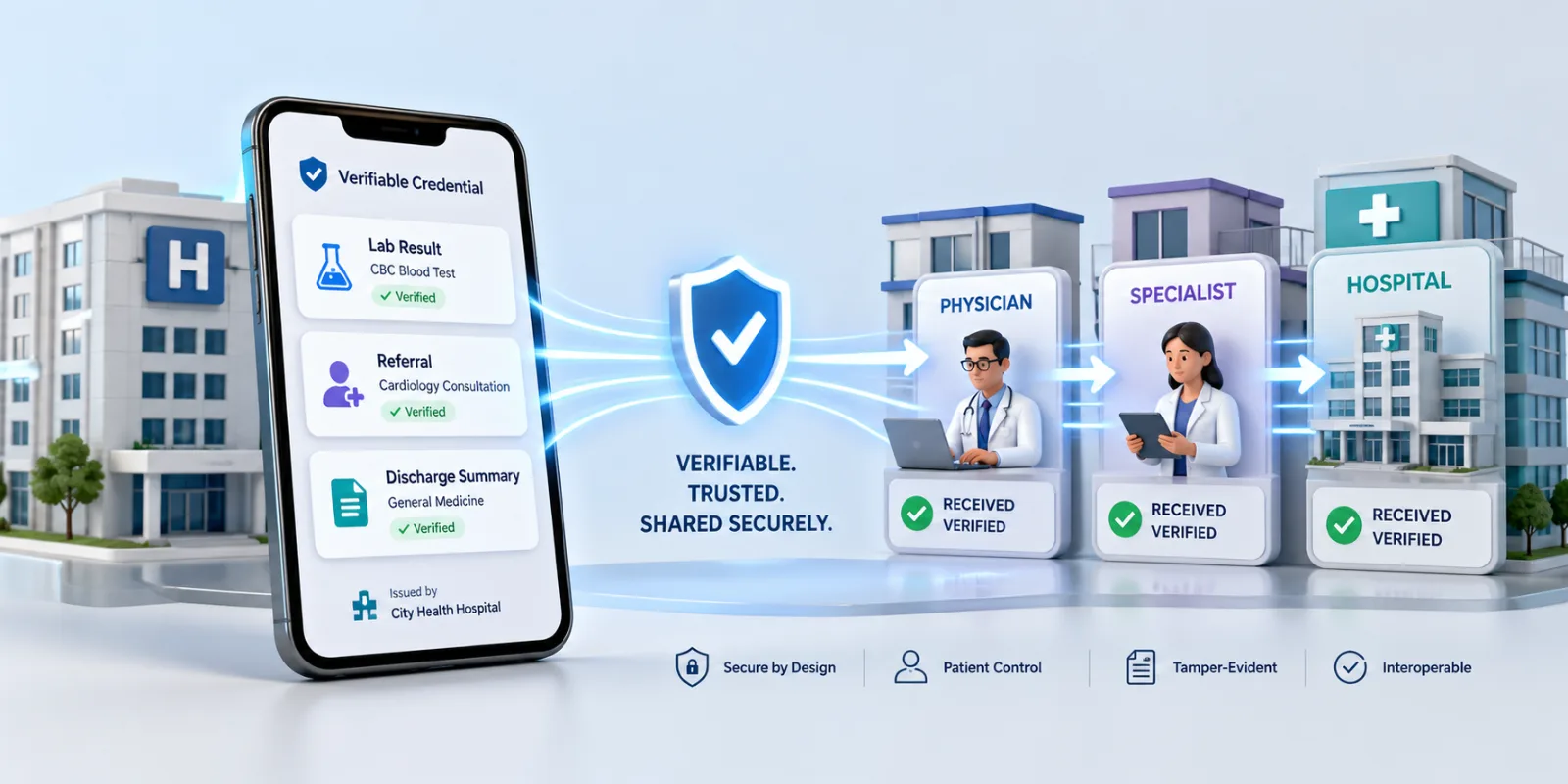
A QR-verified clinical document carries a QR code on the document itself (footer of a discharge summary, header of a lab result, footer of a referral). When scanned, the QR resolves to a hosted proof page on the issuing institution's verification domain (or a contracted business associate's domain), which confirms a small, deliberately limited set of facts about the document.

What the proof page should show:

That the document is registered with the issuing institution and has not been altered since issuance.

The issuing institution's verified identity (legal name, registration reference, verification contact).

The document type (lab result, referral, discharge summary) and the issuance timestamp.

A revocation or supersession status flag (in case the document has been re-issued or withdrawn).

A patient-identifier field that is minimum necessary — typically the patient's name as printed on the document, or a redacted form (initials + last 4 of identifier) depending on the issuer's privacy posture.

What the proof page must not show:

Underlying clinical content. The proof page is a verification artefact, not a portal into the patient's medical record. Detailed lab values, diagnoses, treatment notes and other PHI should never be exposed on a publicly scannable URL.

Anything beyond the minimum necessary to confirm document authenticity.

Any field the patient has not consented to making accessible to the verifier.

This privacy-by-design constraint is what separates a healthcare-grade verification system from a generic one. The cryptographic mechanism — hash of the original document, signed at issuance, comparable on demand — is the same. The presentation layer is much more carefully scoped.

A common implementation pattern is a two-tier proof page. The publicly scannable tier shows only that the document is registered and unaltered, plus the issuer's identity. A second tier, accessed via a token the patient explicitly shares with a specific recipient, can reveal additional fields if and only if the patient has consented to that disclosure. The patient remains in control of what flows downstream.

The verifiable-document workflow for healthcare

The end-to-end flow looks like this. It is intentionally simple — most of the privacy and compliance complexity sits in the platform's architecture, not in the user-facing workflow.

At issuance (the clinic, hospital, or lab)

The clinical document is generated as it is today, from the EHR or LIS (laboratory information system) — discharge summary template, lab report template, referral letter template.

Before final export to PDF, the verification block is added as part of the document footer or header. This can happen as a server-side step in the EHR's document-generation pipeline, or as an add-in step in Word / Google Docs for clinicians who draft outside the EHR.

At the moment the PDF is finalised, the verification platform receives a hash of the document plus the minimum-necessary metadata fields the issuer has approved for the proof page. It does not receive the document content itself unless the issuer's design explicitly chooses to store it.

The platform returns a unique QR (and corresponding URL) that is stamped onto the document at the predefined position.

The PDF is delivered to the patient by the existing channel — patient portal, email, secure messaging, paper printout — with no additional steps.

At verification (the receiving physician, school, employer, insurer)

The recipient opens the PDF (or paper copy).

They scan the QR with any phone camera. iOS and Android both decode QR natively without an app.

The proof page loads in the recipient's browser. They confirm three things: the URL belongs to the issuing institution or its named verification provider, the document type and issuance date match, and the patient name (or redacted form) matches the document.

If all three match, the recipient has high confidence the document is genuine. If any field does not match, the document is treated as suspect and escalated through the recipient's existing fraud-handling process.

The recipient never needs an account, never pays a fee, and never accesses the underlying clinical content unless the patient has explicitly granted that access through the optional second-tier flow.

EHR integration patterns

Most institutions will want verification to happen as a server-side step in the document-generation pipeline, not as a manual click for every clinician. There are three common patterns.

Pattern A: Direct integration with the EHR's document export. The verification platform integrates with the EHR's document generation hook (Epic, Cerner / Oracle Health, Meditech, Athenahealth, Allscripts / Veradigm and others all expose extensibility points). The QR is added at the moment the PDF is generated, with no clinician action required. This is the highest-fidelity path and the right answer for hospitals and large clinic networks.

Pattern B: Middleware between EHR and delivery. For institutions where direct EHR integration is impractical, a middleware step — typically a lightweight service that listens on the document-export queue — applies the verification block before the PDF is sent to the patient portal or email. This pattern adds a few seconds of latency and a deployment surface area, but does not require EHR vendor cooperation.

Pattern C: Word and Google Docs add-ins for clinician-drafted documents. For referral letters, fitness-to-work letters, sick notes and other documents that clinicians draft outside the EHR, a Word or Google Docs add-in lets the clinician add the verification block with one click. This is the right answer for the long tail of clinician-authored documents.

A meaningful share of institutions will use all three patterns concurrently — pattern A for high-volume EHR-generated documents, pattern B as an interim while pattern A is being implemented, and pattern C for clinician-authored letters that fall outside the EHR's document templates.

In all three patterns, the FHIR ecosystem (Fast Healthcare Interoperability Resources) provides the natural integration substrate. Verification metadata can be carried as a FHIR Provenance resource alongside the DocumentReference resource for the issued document, giving downstream FHIR-aware systems a structured way to query verification status as well as scan the QR.

Vendor selection: the questions to ask

Any verification platform that touches healthcare documents is a business associate (under HIPAA) and a processor of special-category data (under GDPR). The vendor evaluation should be at least as rigorous as for any other PHI-touching vendor. The questions to ask:

On compliance posture.

  • Will the vendor sign a HIPAA BAA (US) and a GDPR-compliant Data Processing Agreement (EU/UK)?
  • What independent attestations are in place? SOC 2 Type II, HITRUST CSF, ISO 27001, ISO 27799, NHS DSP Toolkit (for UK)?

Where is data stored, and what cross-border transfer safeguards are in place?

On data minimisation.

  • What data does the platform receive at issuance? Is the document content stored, or only a hash plus minimal metadata?
  • Is the proof page configurable so the issuer can choose exactly which fields appear?

Is there a patient-controlled tier for additional disclosure beyond the public proof page?

On continuity.

What happens if the vendor goes out of business or is acquired? Can the issuer export verification records to be hosted elsewhere?

What is the SLA for the proof page being available (it needs to work for the lifetime of the document, not the lifetime of the contract)?

On usability.

  • Does the verification flow work for downstream recipients without an account or app?
  • Does it work on paper as well as digital documents?

Is the proof page available in the languages the patient population uses?

On integration.

Does the platform integrate with the institution's EHR, LIS, and document-generation tooling, or will middleware be required?

Does it expose a FHIR-compatible API for verification status?

A vendor that cannot answer the first two categories cleanly should not be on the shortlist for any healthcare deployment.

  • Frequently asked questions

Does QR verification of clinical documents create new HIPAA exposure?

It can, if implemented carelessly — for example, by exposing PHI on a publicly scannable URL. Implemented correctly, with a minimum-necessary proof page and patient-controlled access to additional fields, it should reduce overall PHI exposure by replacing a meaningful share of PHI-laden phone calls and email exchanges with a hash-based authenticity check that does not transmit clinical content.

Is QR verification the same as a digital signature on the document?

No. A digital signature (in the cryptographic sense — for example, a PAdES-compliant PDF signature) attests that a specific signer produced the document. A QR-verified document attests that the document is the one the issuing institution registered, and links to a hosted proof page that confirms it. Many institutions use both: a clinician's digital signature inside the PDF, plus a QR verification block on the document for downstream recipient convenience.

What about FHIR-based interoperability — does that not solve verification?

FHIR is excellent for structured, system-to-system exchange of clinical data between authorised parties. It does not solve the patient-handoff problem, which is documents flowing to recipients (employers, schools, insurers, foreign physicians) who are not part of the issuer's FHIR network. QR verification covers exactly the cases FHIR does not.

Does this work for paper documents — discharge summaries that are still printed at the bedside?

Yes. A QR printed on paper scans the same as one on a screen. This matters in healthcare more than in many other sectors because paper handoffs remain common — discharge papers, pharmacy hand-offs, sick notes, vaccination cards.

How does a patient share additional fields beyond the public proof page?

Through a tokenised link the patient generates and shares with a specific recipient (a new physician, an insurer, an employer). The token grants access to a defined set of additional fields for a defined period. This keeps the patient in control and the verifier supplied with what they need.

Does this comply with the 21st Century Cures Act information-blocking provisions?

It supports compliance, in the sense that QR verification is an additive layer that helps patients access and share their records — which is exactly the Cures Act's intent. It is not a substitute for the API-based access requirements the Act imposes. The two are complementary.

What about jurisdictions with stricter rules — for example, German medical confidentiality (StGB §203) or French medical secrecy?

Stricter regimes require correspondingly tighter design choices: more restrictive default proof pages, narrower minimum-necessary fields, and in some cases on-shore-only data residency. A vendor capable of operating in the strictest jurisdiction can typically be configured down for less strict ones; the reverse is rarely true.

The bottom line

Healthcare documents leave the issuing institution every day and travel through a series of handoffs no one can verify. The result is a high-volume, structurally exploitable fraud category, a steady drag of "is this document real" phone calls back to clinic admin lines, and patients who are functionally responsible for vouching for their own clinical records to whoever asks.

A privacy-by-design QR verification layer changes that without expanding the privacy surface area. The patient still receives their document by the same channel they receive it today. Downstream recipients can confirm authenticity in two seconds without an account, without seeing PHI they were not entitled to, and without calling the clinic. The clinic stops being the single point of verification for documents that have already left its building.

The implementation work is real but bounded — EHR integration for high-volume documents, middleware for the interim, Word and Google Docs add-ins for clinician-authored letters, and a vendor evaluation that takes the BAA and DPA conversations seriously. The compliance rewards are commensurate: less PHI on the wire, faster patient handoffs, and a defensible audit story for OCR / ICO / regulator conversations.

To see the verification model in action, read how QR document verification works, or talk to the team about a healthcare deployment via verifydoc.ai.

Back to blog