
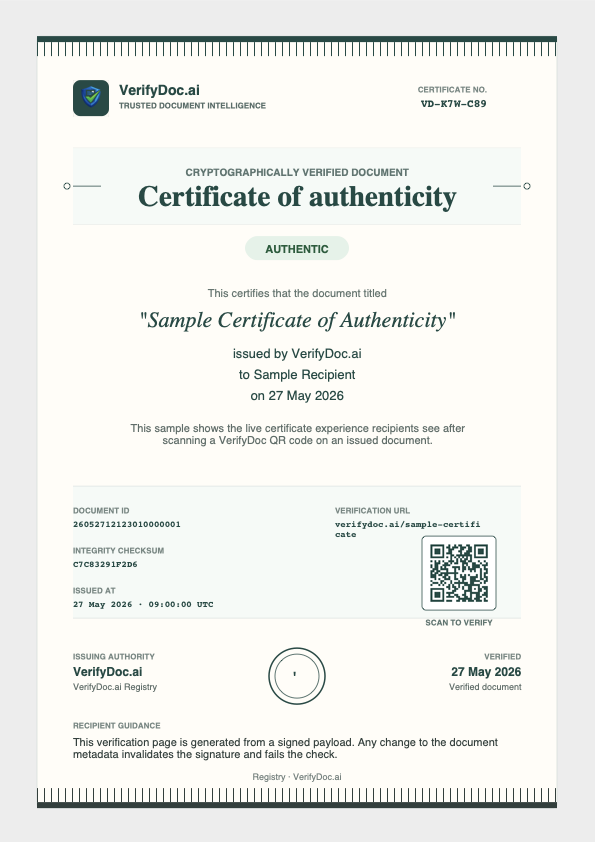
Signed in your workspace
QR code and certificate attached at issuance.
Attach a QR code, ship the document, anyone can verify in seconds. No special scanners, no prior accounts.
Trusted by leading institutions




VerifyDoc.ai is designed for teams that cannot stop at a signature alone. It keeps proof, verification, and signing attached to the same document so recipients can confirm what they received without asking your team to manually revalidate it.
QR code and certificate attached at issuance.
Email, print, archive. Proof stays with it.
No app, no account. A phone camera is enough.
Authenticity is confirmed against the original.
Attach a QR code and hosted proof page to contracts, letters, certificates, and statements so anyone can verify the latest trusted version in seconds.
Create signature flows, place signer fields, issue certificates of authenticity, and keep the verification record tied to the same document lifecycle.
VerifyDoc.ai is built for document-heavy teams using Google Docs and Microsoft Word, so verifiable output fits normal drafting and approval workflows.
Track who signed, when they acted, what version they touched, and how the document should be checked later without sending recipients back into your workspace.
Many e-signature tools help complete the signing moment. VerifyDoc.ai is built for the next step too: proving the document is still authentic when it is forwarded, printed, archived, or reviewed outside your workspace.
VerifyDoc.ai makes the document itself verifiable, not just the act of signing.
QR proof page, certificate, and verification record travel with the document.
Signature proof often stays inside the signing platform rather than the document itself.
Recipients can scan the QR code on printed copies and validate the source instantly.
Printed documents usually lose their verification context once exported.
Designed for native drafting, review, signing, and verification around common office tools.
Integrations often focus on send-for-sign only, not full document authenticity.
Issued alongside the document as a standard part of the verification flow.
Usually requires separate audit exports or plan-specific features.
Practical guides, regulatory insights, and real-world use cases on how businesses are creating tamper-proof documents and building trust at scale.
Start free in under a minute. Add the QR code, certificate, and verification page to any document your team sends.