A tenant hands you a signed lease. A vendor emails a notarized W-9. A new hire uploads a diploma and two references. A contractor submits a proof-of-insurance certificate twenty minutes before the job starts.
Three years ago, a quick glance was enough. In 2026, a quick glance is a liability.
Between Q1 2024 and Q1 2025, synthetic identity document fraud jumped 311%. The monthly volume of AI-generated document fraud grew roughly fivefold in just eight months of 2025. In a recent survey of 90 fraud and risk leaders, 97.8% said they were concerned about AI-enabled document fraud. Deepfake-related losses in the United States alone tripled to $1.1 billion in 2025, and Deloitte projects generative-AI fraud will hit $40 billion annually in the U.S. by 2027.
The punchline for small and mid-sized businesses, HR teams, and compliance leaders is simple: if you still verify documents by trusting a PDF preview and a typed signature, you are operating on 2019 assumptions in a 2026 threat environment.
This guide explains how modern document authentication actually works — the mechanics, the legal framework, and the exact process any small team can use to verify document authenticity without slowing the business down. You'll leave with a playbook you can apply this week, whether you're reviewing a signed contract, an employee record, or a certificate issued to one of your own customers.
What "document authenticity" actually means in 2026
When people say they want to verify document authenticity, they usually mean one of three different things at once. Separating them is the foundation of any real document authentication process.
Authenticity asks: did this document really come from the person or organization it claims to come from? It is a question about the signer or issuer.
Integrity asks: has the document been altered since it was signed or issued? It is a question about the file itself — pages, text, images, metadata.
Non-repudiation asks: can the signer credibly deny having signed it later? This is the legal backbone that lets electronic documents hold up in court, in an audit, or in front of a regulator.
A modern verification system answers all three questions with evidence, not trust. That evidence takes three technical forms: an electronic signature captured with clear intent, a cryptographic hash that locks the file's contents, and a verifiable record — often exposed through a QR code — that anyone can check without calling you.
Once you see these three pieces working together, document verification stops feeling like a bureaucratic checkbox and starts feeling like what it really is: a chain of custody for paper.
Why document fraud just became an SMB problem
For years, sophisticated document fraud was an enterprise bank problem. Specialist teams defended against specialist attackers. That era is over.
Two shifts have changed the economics of fraud for everyone else. First, generative AI has collapsed the cost of producing convincing fake documents. Creating a forged driver's license, diploma, pay stub, or W-2 that passes casual inspection now takes minutes and almost zero skill. Research from across the industry estimates U.S. firms lose roughly 9.8% of revenue to fraud on average, and that for every $1 of direct fraud loss, merchants absorb about $4.61 in downstream costs — chargebacks, investigations, remediation, lost labor.
Second, attackers are now going after smaller targets on purpose. Cyble's 2025 executive-threat monitoring found AI-powered deepfakes were involved in over 30% of high-impact corporate impersonation attacks. Large banks have detection teams. A 14-person property management company, a boutique law firm, or a 40-employee staffing agency typically does not. That asymmetry is the point.
The result is a strange new reality for SMBs, HR groups, and compliance teams: the documents flowing across your desk every day — offer letters, rental applications, vendor contracts, insurance certificates, diplomas, ID copies — are now the highest-leverage attack surface in your business. Most breaches no longer start at the firewall. They start at an inbox, with a PDF.
That is the problem document verification is designed to solve.
The three pillars of document verification
Modern document authentication is built on three pillars. You can think of them as "who," "what," and "proof."
Pillar 1: the electronic signature (the "who")
An electronic signature is the legal act of a person indicating their intent to be bound by the contents of a document. It can be a typed name, a drawn signature, a click on an "I agree" button, or a biometric tap. What turns those inputs into a valid e-signature are four things the law cares about: intent to sign, consent to do business electronically, association of the signature with the record, and record retention.
An e-signature answers the authenticity question on the human side: a specific identifiable person intentionally signed this specific document at a specific moment. Good e-signature platforms capture signer identity, IP address, timestamp, device fingerprint, and an audit trail of every action — opened, viewed, signed, declined — so you can reconstruct the event long after it happens.
Pillar 2: the digital signature and cryptographic hash (the "what")
Here is where most non-technical readers get surprised. An electronic signature is a legal concept. A digital signature is a cryptographic mechanism — and they are not the same thing.
When a document is digitally signed, the signing software generates a hash of the file — a unique fingerprint, usually 256 bits long, that changes completely if even a single pixel of the document changes. That hash is then encrypted with the signer's private key. Anyone can later decrypt it with the signer's public key and re-hash the document themselves. If the two hashes match, the file has not been altered since it was signed. If they do not, something — a page, a number, a name — has changed.
Digital signatures answer the integrity question. They are the reason you can email a contract across the world and prove, years later, that nobody edited a clause on the way.
Pillar 3: QR code verification and certificates of authenticity (the "proof")
Electronic and digital signatures do their work inside the document. The third pillar brings that work outside the document so a third party can verify it in seconds.
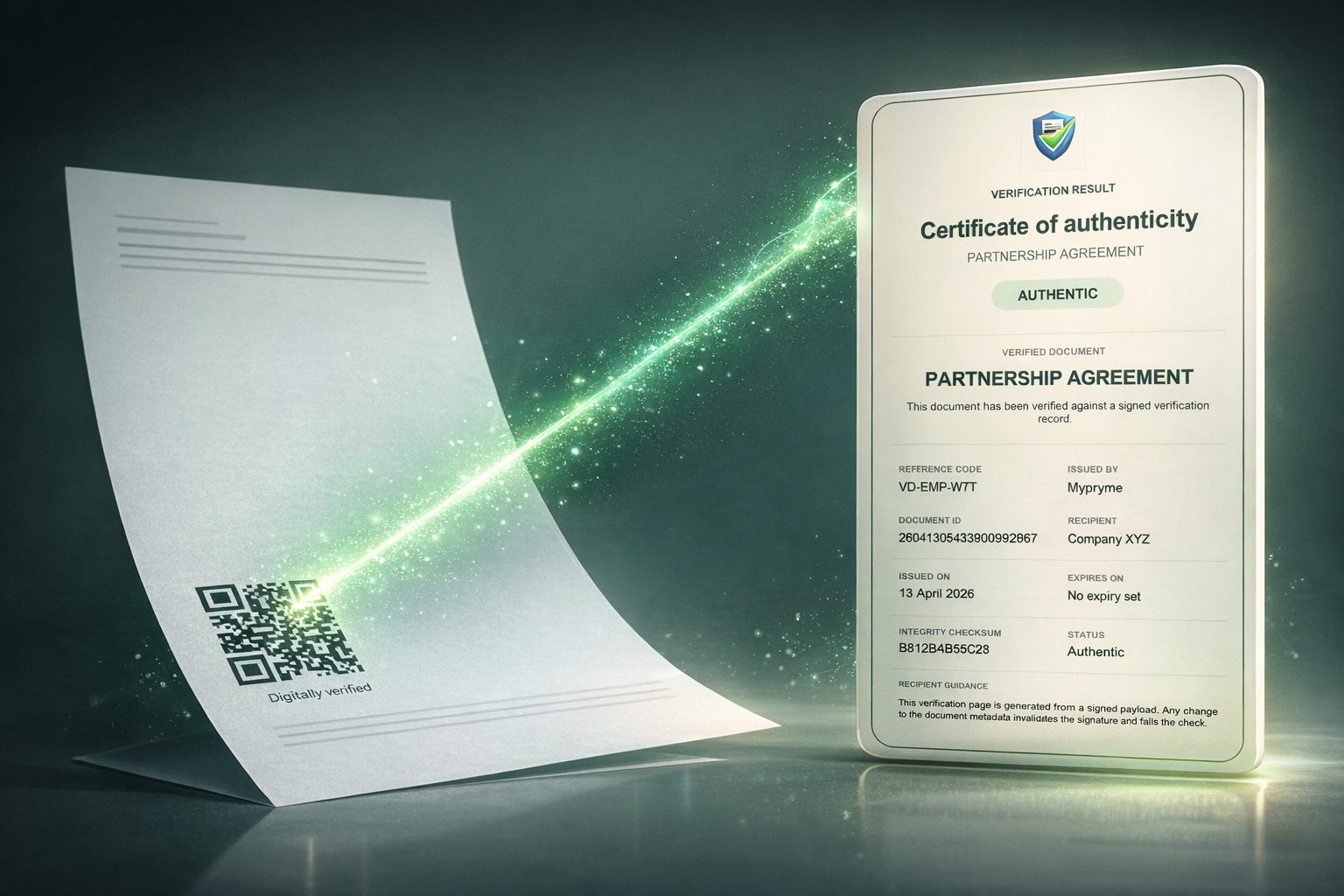
A QR code-based verification approach embeds a unique scannable code on every page or at a designated location on the document. When someone scans it — a landlord, a recruiter, a bank, an auditor, a border agent — the code routes them to a verification page controlled by the issuer. That page cross-references the document's hash against a trusted record and returns a clear verdict: authentic, altered, or unknown.
The document's content is hashed and matched against the signature encoded in (or linked from) the QR code. If the hashes match, the document is authentic. If the document has been tampered with, the verification fails loudly.
The certificate of authenticity is the human-readable output of that lookup. It typically includes the issuer's identity, the recipient's identity, the issue date, the unique document ID, the signer audit trail, and a cryptographic proof. It is the modern equivalent of a wax seal — except it is machine-verifiable, tamper-evident, and portable.
Tools like VerifyDoc.ai sit at this third pillar: they let any business issue or sign a document, attach a QR code, and give the next person who touches that document a one-tap path to a certificate of authenticity. That is the ingredient most verification stacks are missing in 2026.
Electronic vs. digital signatures: a clear-eyed comparison
Because the two terms get swapped constantly, it is worth a simple side-by-side.
An electronic signature is the legally recognized act of signing — the intent, consent, and audit trail. It can be backed by strong identity checks or not. It is valid under U.S. federal law (ESIGN), U.S. state law (UETA), and EU law (eIDAS) when the four compliance requirements are met.
A digital signature is a specific cryptographic technology — a hash encrypted with a private key — used to prove the document has not been tampered with and to tie it to a verified identity issued by a certificate authority.
The strongest document verification stacks use both: an electronic signature to capture the human act, and a digital signature to mathematically lock the file. The EU's eIDAS framework formalizes this with three tiers: simple electronic signatures, advanced electronic signatures (which require a digital signature backed by a unique identity), and qualified electronic signatures (which add a qualified certificate issued by a trusted service provider and carry the same legal weight as handwritten signatures across all 27 member states).
U.S. law under ESIGN and UETA is more permissive — it does not require the advanced/qualified distinction — but courts increasingly expect the same underlying evidence: identity, intent, integrity, and audit trail. If you are operating across borders, defaulting to the higher standard is the safer choice.
How QR code document verification works, step by step
Here is the end-to-end flow most modern verification platforms follow. Understanding it makes every subsequent decision — vendor selection, internal training, customer-facing language — far easier.
Document is finalized. The issuer (you or your software) assembles the final version of the document — a contract, certificate, invoice, diploma, policy, insurance cert.
Content is hashed. The platform generates a cryptographic hash (typically SHA-256) of the entire document. That hash is a unique fingerprint tied to every byte of the file.
Record is written. The hash, the issuer identity, the recipient identity, the date, and any signer audit trail are written to a trusted verification record — in a secure database, a signed registry, or in some cases a blockchain-anchored ledger.
QR code is generated. A QR code is generated that encodes a pointer to the verification record and, optionally, a short verification code the verifier can type in manually.
QR code is embedded. The code is placed on the document — often on every page, to defeat page-swapping attacks — along with a short human-readable note: "Scan to verify authenticity at verifydoc.ai."
Document is distributed. The document is sent, printed, posted, or uploaded wherever it needs to go.
A verifier scans. The next person who needs to trust that document scans the QR code with any smartphone camera. No app install required.
Hash is recomputed. The verification service recomputes the hash of the current file (if uploaded) or checks the encoded hash against the stored record.
Verdict is rendered. The verifier sees a clear page: issuer name, issue date, recipient, document type, and an authenticity status — verified, tampered, revoked, or expired.
The crucial point is step 8. A QR code alone is not security — a forger can generate a QR code. Security comes from the hash comparison behind the QR code. That is the line between a cosmetic badge and real cryptographic verification.
Anatomy of a certificate of authenticity
A well-constructed certificate of authenticity is not a decorative PDF. It is a structured record that a court, auditor, regulator, or counterparty can lean on. At minimum it should contain:
A unique document identifier that cannot collide with any other record.
Issuer identity with a verifiable organizational profile.
Recipient identity and, where relevant, identity verification evidence.
Document type and the title or description of the underlying record.
Issue date and time, stored in UTC with a trusted timestamp.
Cryptographic hash of the underlying document (e.g., SHA-256).
Signer audit trail, including IP addresses, devices, and timestamps for every signer action.
Legal framework cited — ESIGN, UETA, eIDAS tier — so the certificate can be evaluated against the right standard.
Verification endpoint — the URL and, if relevant, a short verification code the verifier can type in.
Revocation status so a document can be invalidated if the underlying event changes (a terminated employee, a revoked license, a superseded contract).
The difference between a PDF with a pretty ribbon and a real certificate of authenticity is whether an outsider, with no prior relationship to you, can independently verify all of the above in under thirty seconds. That test is the product spec.
The legal framework in plain English
Three regimes do most of the work. You should know the shape of each, even if you never draft a contract yourself.
ESIGN (U.S. federal). The Electronic Signatures in Global and National Commerce Act gives electronic signatures the same legal effect as handwritten signatures across the United States. It governs interstate and international commerce and takes precedence when a transaction crosses state lines.
UETA (U.S. state). The Uniform Electronic Transactions Act has been adopted by 49 states (New York has its own equivalent) and governs intra-state transactions. UETA and ESIGN are deliberately aligned; both require the same four conditions — intent, consent, association, retention.
eIDAS (EU). The EU's Electronic Identification, Authentication and Trust Services regulation defines three tiers of electronic signatures — simple, advanced, and qualified. A qualified electronic signature requires a certificate issued by a qualified trust service provider and is legally equivalent to a handwritten signature across all 27 member states. Advanced signatures require identity binding and tamper detection. Simple signatures cover clickwrap and typed names.
Several categories of documents remain carve-outs almost everywhere — wills, certain family-law matters, and specific court documents — and still require wet signatures in most jurisdictions. For nearly everything else a modern business touches, properly verified electronic and digital signatures are legally sufficient. The real question has shifted from "is this legal?" to "can I prove it?" Verification is the answer to the second question.
The playbook: how to verify document authenticity in your business
Here is a sequence any SMB, HR team, or compliance function can operate this quarter to verify document authenticity end-to-end. It assumes you are both receiving documents and issuing them.
If you are an SMB owner or operator
Start with the documents that carry real financial or legal weight: contracts, NDAs, invoices over a threshold, insurance certificates, vendor onboarding packets, and customer proof-of-identity.
For every one of these, adopt a two-part rule. Sign it on a platform that captures intent, consent, audit trail, and a digital signature. Then issue it with a QR code and a certificate of authenticity, so your counterparties can verify without emailing you back.
On the receiving side, train whoever handles the inbox — often one person, often without a formal security role — to do three things: scan any QR code on incoming documents, verify the certificate on the issuer's domain, and flag any document without a QR code for a five-minute confirmation call with the sender. (For a deeper walk-through, see our guide on how to verify a signed PDF.)
This single habit shuts down most AI-generated document fraud. Attackers can fake a PDF. They cannot fake a cryptographic hash registered at an issuer you trust.
If you are in HR
You are in the crosshairs. Diplomas, transcripts, I-9 documents, references, and offer letters are now routinely forged with generative AI.
Adopt three rules. First, issue every offer letter and every official HR document with a QR code and a certificate of authenticity, so your employees can later prove to banks, landlords, and immigration officials that the document came from you. Second, require candidate-submitted credentials to come from issuer-controlled verification pages, not as raw PDFs — most accredited institutions now issue QR-verifiable diplomas and transcripts, and those that do not should be confirmed directly with the registrar. Third, build a revocation process: when an employee departs, their offer letter and employment verification letters should be revocable from a central registry so they cannot be reused.
If you are in legal or compliance
Your job is to design for the audit, not just the day. Three principles apply.
One, insist on a complete audit trail. Every executed document in your stack should produce evidence that answers the authenticity, integrity, and non-repudiation questions without you having to reconstruct anything.
Two, pin your standard to the higher of the applicable frameworks. If you operate in the EU or serve EU customers, default to advanced or qualified signatures under eIDAS. If you are U.S.-only, align your process to ESIGN and UETA's four requirements, but collect the same underlying evidence anyway.
Three, treat verification as a customer-facing feature, not a back-office process. Counterparties, auditors, and regulators should be able to verify any document your organization issues in under a minute, from any device, without contacting you. If that is not true today, it is the single highest-leverage investment you can make.
Seven red flags that a document has been tampered with
Even with good technology, human pattern recognition still catches a lot. Train your team on these signals.
Inconsistent fonts or kerning. AI-generated and hand-edited documents frequently mis-render fonts between paragraphs. Zoom in.
Metadata mismatch. The PDF's creation date, author, or software fields contradict the document's claimed origin. Right-click, view properties.
Missing or mismatched audit trail. An e-signed document arrives without a signer certificate, audit log, or any cryptographic evidence of when and how it was signed.
Page-level visual drift. Margins, headers, or footer positions shift between pages — a signature of page-swapping attacks.
QR code mismatch. The QR code routes to a domain that is not the issuer's — or to a verification page that does not cite the specific document ID.
"Urgent" friction. Deepfake-assisted fraud now leans heavily on urgency to prevent verification. Pressure to sign or pay before a verification call is the single most reliable AI document fraud tell in 2026.
Unusual channel. The document arrives through a channel you have never received documents from before — a personal Gmail, a WhatsApp attachment, a DocuSign clone domain.
One or two of these might be noise. Three or more is almost always signal.
Building a verification-first culture
Technology is the easy part. Culture is the part that actually closes the gap.
The teams that weather 2026 well share a few traits. They treat verification as a five-second reflex rather than a ten-minute project, so it happens every time. They measure verified documents as a percentage of total documents handled — not as a vanity metric, but as an operational one. They make it safe to pause a transaction to verify, including when the request comes from someone senior. And they externalize trust: they do not ask a counterparty to trust them, they give the counterparty a way to verify them in a single scan.
The companies that struggle are not usually the ones with bad tools. They are the ones where "just send me the PDF" is still the cultural default.
- Frequently asked questions
Is an electronic signature legally binding?
Yes. Under the ESIGN Act and UETA in the United States, and under eIDAS in the European Union, electronic signatures carry the same legal weight as handwritten signatures when intent, consent, association, and retention are established. Certain documents — wills, some family-law matters — remain carve-outs.
What's the difference between an electronic signature and a digital signature?
An electronic signature is a legal act indicating intent to sign. A digital signature is a specific cryptographic technology — a hashed file encrypted with the signer's private key — used to prove the document has not been altered. The strongest verification uses both. For a deeper breakdown, see electronic signature vs. digital signature.
How does a QR code verify a document?
The QR code links to a verification record controlled by the issuer. When scanned, the verifier sees the document's hash, audit trail, and authenticity status. If the document has been altered, the hash comparison fails and the verification page flags it.
Can a QR code on a document be forged?
A forger can generate a QR code, but it will not resolve to a legitimate verification page on the issuer's domain. Always verify that the QR code points to the issuer's real domain — verifydoc.ai, for example, not a lookalike — and that the verification page cites the specific document ID.
Do I need a blockchain to verify documents?
No. Most verification is done against a trusted registry controlled by the issuer. Some providers anchor records to public blockchains for additional tamper resistance, but the core security comes from the cryptographic hash and the issuer's chain of custody, not from the blockchain itself.
How long should I retain signed documents?
Retention requirements vary by document type and jurisdiction. A common default is seven years for contracts and financial records, longer for employment and tax documents, and indefinitely for key corporate records. Your e-signature platform should store the audit trail for at least as long as the underlying document.
What does a certificate of authenticity actually contain?
A unique document ID, issuer and recipient identity, issue date, document type, cryptographic hash, signer audit trail, the legal framework cited, a verification endpoint, and revocation status. Anything less is marketing.
Where to go from here
The core insight of 2026 is that document trust is no longer a default — it is a feature you build. Every document your business issues is either a liability or an asset, depending on whether the next person who touches it can verify it in under a minute.
That is the problem VerifyDoc.ai was built to solve: let any business sign documents electronically, attach a QR code, and issue a certificate of authenticity that anyone — a customer, a landlord, a recruiter, a bank — can verify with a single scan. No forgery defense you build in-house will be as effective, in 2026, as simply making your documents independently verifiable by default.
If you lead an SMB, an HR function, or a compliance team, the move this quarter is small and specific: pick the three document types that carry the most weight in your business, put them on a verification-first stack, and tell your counterparties exactly how to scan. The first week will feel like a small change. Six months in, it will quietly have eliminated an entire category of risk.
Your documents deserve a chain of custody. Your customers deserve a way to trust them. The technology is here. The only question left is whether the next document that leaves your office can be verified.
Want to see how QR-verified documents work in your own workflow? Try VerifyDoc.ai free and issue your first certificate of authenticity in under five minutes.